What is a Vector Image? Learn How to Create One
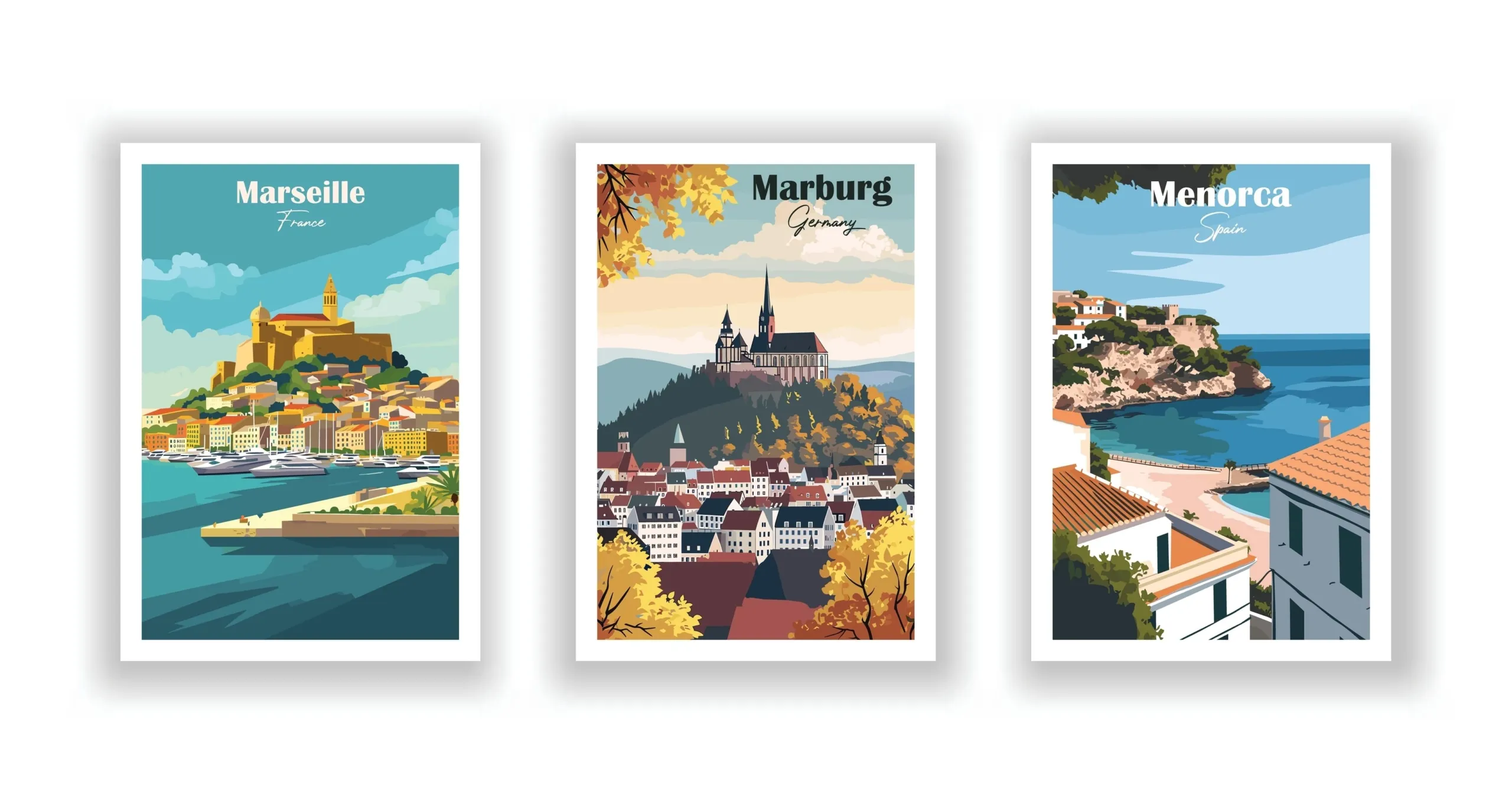
Vector graphics are a designer's only weapon to create artwork from the simplest logos to the most complex illustrations that can be scaled. Vector graphics are resolution-independent, unlike normal raster images. This means their sizes may be increased or decreased without losing any quality, which makes them very useful for web or print media. Yet, to a novice in graphics going through the study of graphic design would seem to be daunting.
Here's a quick guide to vector graphics, as well as some must-know techniques and tactics for generating professional-quality drawings.
What is a Vector Image?
A vector image is a graphic representation created using mathematical equations to define shapes, lines, and colours. Unlike raster images, which are composed of pixels and can become blurry when resized, vector images maintain their clarity and quality at any size. This unique characteristic makes them ideal for various applications, particularly in graphic design and branding.
Characteristics of Vector Images
Below are some of the characteristics of vector images:
- Scalability: These vector images can be resized without losing quality. This is because they are defined by paths rather than pixels, allowing for infinite scaling.
- Small File Size:Vector files typically require less storage space compared to raster images, which can be quite large due to their pixel-based nature.
- Editability: Each component of a vector image can be manipulated independently. Designers can easily change colours, shapes, and sizes without affecting the overall quality.
- Precision:Vector graphics' mathematical basis allows for precise control over each element, making them suitable for detailed illustrations and logos.
Applications of Vector Images
The application of vector images is as follows:
- Logo Design:Companies often use vector graphics to ensure they look sharp on business cards, websites, and billboards.
- Illustrations:Artists use vector graphics to create illustrations that can be scaled for different formats without losing detail.
- Custom Neon Signs: The clarity of vector images makes them perfect for designing bright and eye-catching custom neon signs.
- Wall Graphics:Businesses utilise vector artwork for wall graphics to maintain high-quality visuals in large formats.
What is Vector Artwork?
Vector artwork refers to any graphic or design created using vector graphics. It harnesses the advantages of vector images to produce versatile, scalable designs across various media.
Public Broadcasting Corporation, like the BBC, uses vector graphics extensively throughout its identification and promotional materials.
Components of Vector Artwork
Vector artwork consists of individual elements defined by mathematical equations. These components include:
- Paths: The lines that make up the shapes in the artwork.
- Nodes:Points that define the start and end of each path.
- Control Points: These points allow designers to manipulate the curves and angles of the paths.
Benefits of Vector Artwork
Below are some of the benefits of vector artwork:
- High Quality at Any Size: Since vector artwork is resolution-independent, it looks great on small and large displays.
- Easy Modification:Designers can quickly alter colours, shapes, and sizes without losing quality or detail.
- Efficient Workflow: The ability to create and edit vector artwork efficiently allows designers to produce high-quality graphics in less time.
For detailed information check out our Shop Sign Ideas: All You Need to Know blog.
What is Vector Format for Logo?
They mean the specific file types of vector images. Commonly used vector formats include:
- AI (Adobe Illustrator): A proprietary format primarily to be used by Adobe Illustrator.
- EPS (Encapsulated PostScript):A versatile format that can be used with many graphic design software packages.
- SVG (Scalable Vector Graphics):A Web-friendly file, SVG allows quality to remain intact, even when scaled up or down.
Importance of Vector Format for Logos
Using a vector format for logos is crucial because:
- Scalability: Logos need to be adaptable for various usesfrom business cards to billboards without losing clarity.
- Editing Flexibility:Logos often require updates or modifications; vector formats allow designers to make these changes easily.
- Professional Appearance:A well-designed logo in a vector format conveys professionalism and attention to detail.
What is a Vector File Format?
A vector file format is a type of file specifically designed to store vector graphics data. These formats use mathematical equations rather than pixels, enabling high-quality scaling and editing capabilities.
Common Vector File Formats
There are three types of vector formats highlighted for you:
- AI (Adobe Illustrator):Ideal for creating complex illustrations and designs.
- EPS (Encapsulated PostScript): Widely used in professional printing and graphic design.
- SVG (Scalable Vector Graphics):Popular for web use due to its compatibility with modern browsers.
Advantages of Using Vector File Formats
Some of the perks of vector-based file formats are as follows:
- Quality Preservation: They maintain image quality regardless of size adjustments.
- File Size Efficiency: Typically smaller than raster files, making them easier to store and share.
- Cross-Platform Compatibility: Many vector formats can be opened in various graphic design software.
What is a Vector Illustrator?
A vector illustrator is a tool or software application to create vector graphics. Adobe Illustrator is one of the most popular examples, providing designers with powerful tools for creating intricate designs.
Features of a Vector Illustrator
There are three features of a vector illustrator. They are as follows:
- Drawing Tools: Includes brushes, pen tools, and shape tools that allow users to create precise lines and shapes.
- Path Editing: Users can manipulate paths easily by adjusting nodes and control points.
- Colour Management: Offers various options for filling shapes with colours or gradients.
How Vector Illustrators Enhance Design Workflows
Vector illustrators streamline the design process by providing intuitive interfaces and powerful features that enable efficient creation and editing of wall graphics.
- Intuitive Interfaces: User-friendly interfaces serve to simplify the design process and provide vector illustrators with designers' focus towards creativity rather than technicalities.
- Editing Flexibility:It allows high-grade editing that enables fast modification of colors, shape, and size without compromising image quality.
- Scalability: Vector graphics can be enlarged infinitely without loss of any details, which makes them perfect for web designs or for large prints alike.
- File Size Efficiency: Vector files take up a relatively smaller space on the hard disk compared to raster images, so they load in less time, making sharing easy between teammates and clients.
How Do You Make Vector Art?
Making vector art involves transforming sketches or ideas into digital illustrations using vector software such as Inkscape. Such steps include:
Step 1 : Open the Inkscape software present on your system.
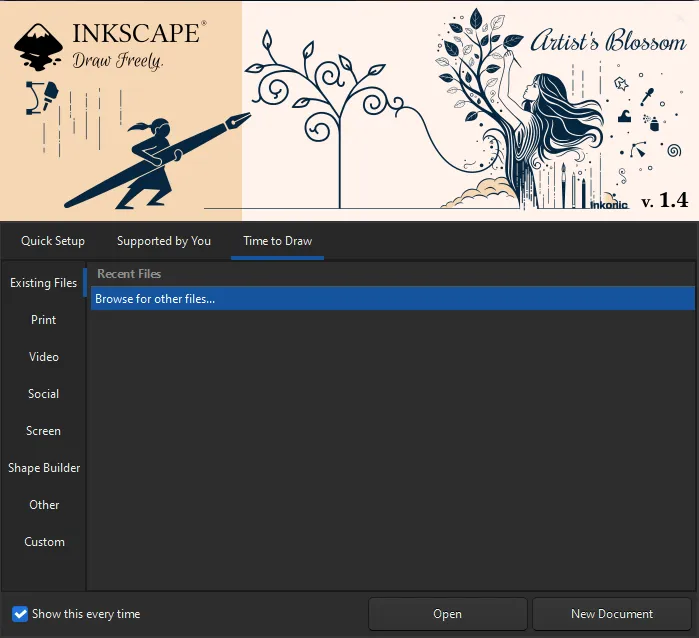
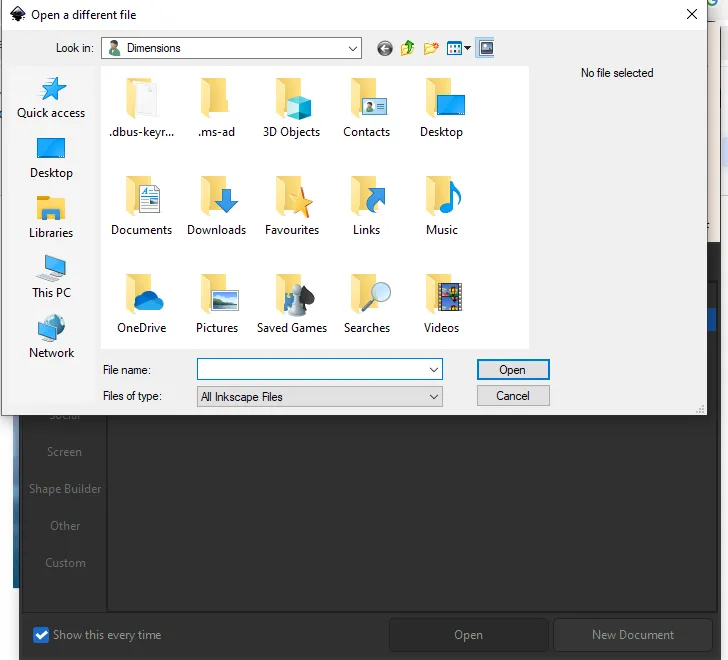
Step 2: Click on the Open option and select the image that you wish to import
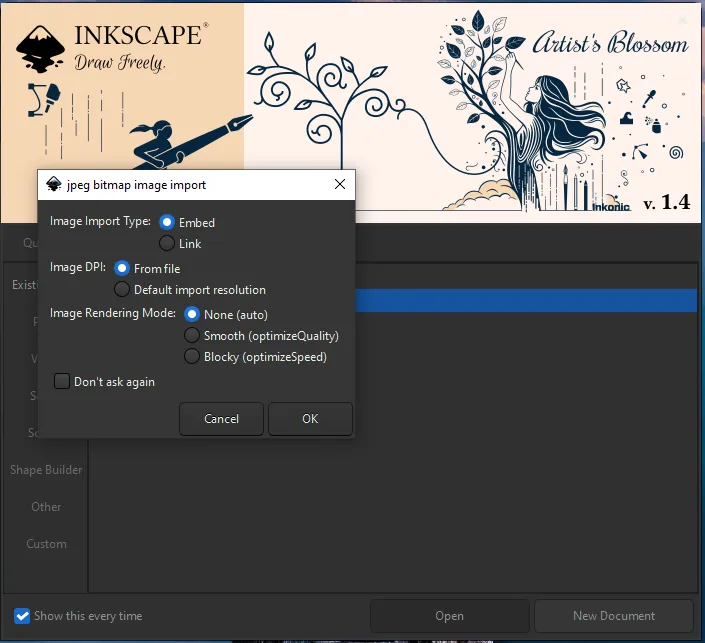
Step 3: A “jpeg bitmap image import” dialogue box appears on the screen. Choose “Smooth (Optimise Quality)”.
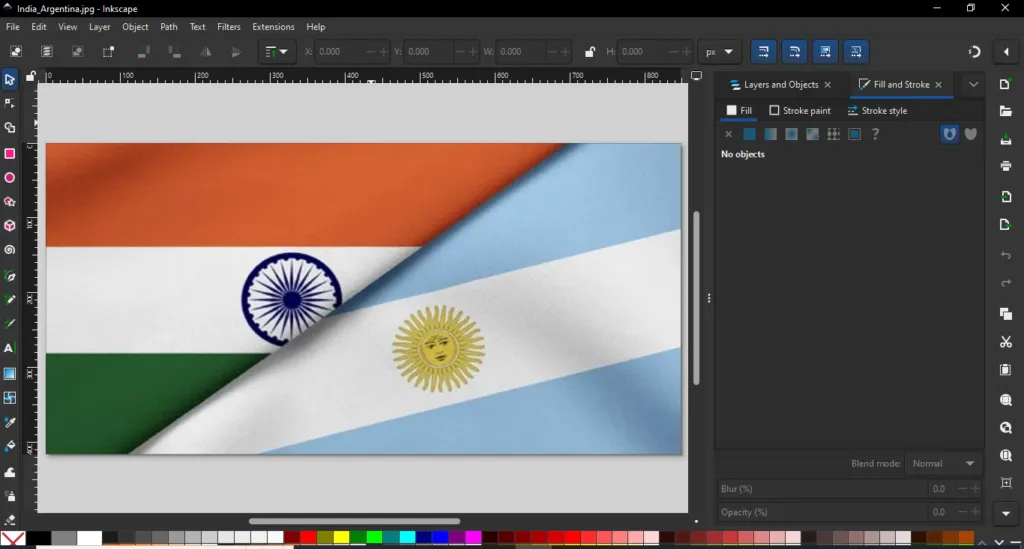
Step 4: The image of your choice has been imported within Inkscape.
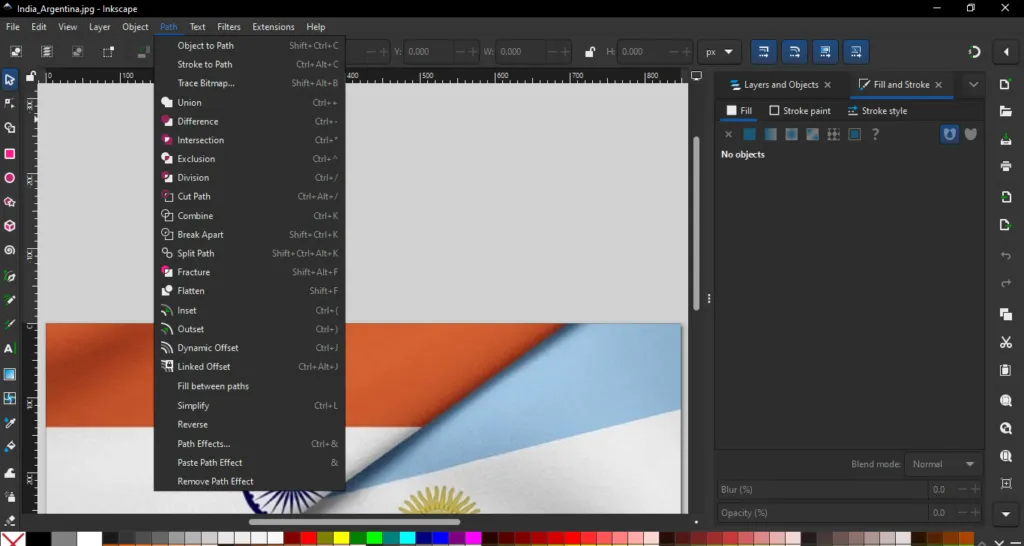
Step 5: After the image has been imported click on “Path” option and then choose Trace Bitmap to option and a dialogue box appears on the right hand side of the image.
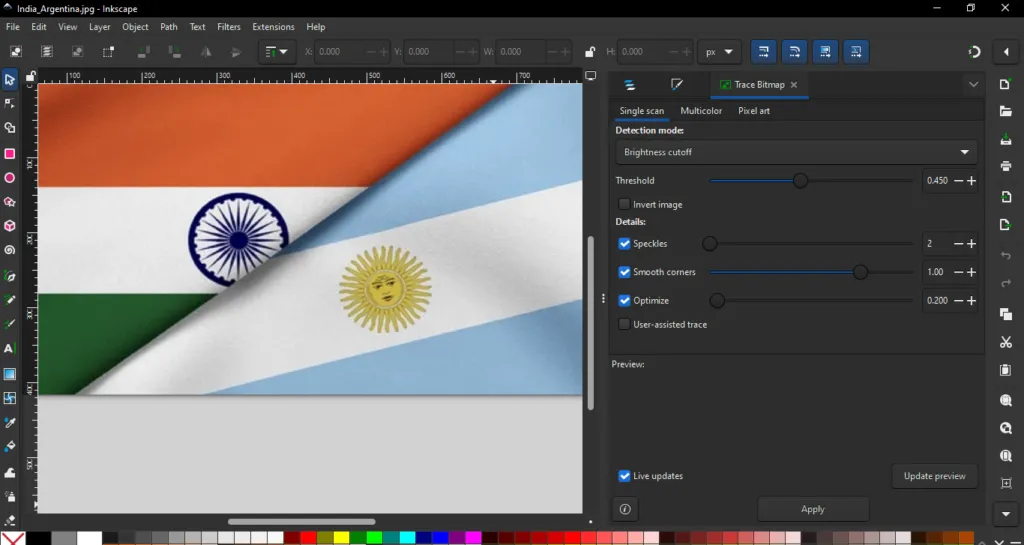
Step 6: Click on those three dots present best the Preview oand drag it right across the page when it gets big enough to shift the preview window over to the right hand side. This mans that our image will be seen much clearer.
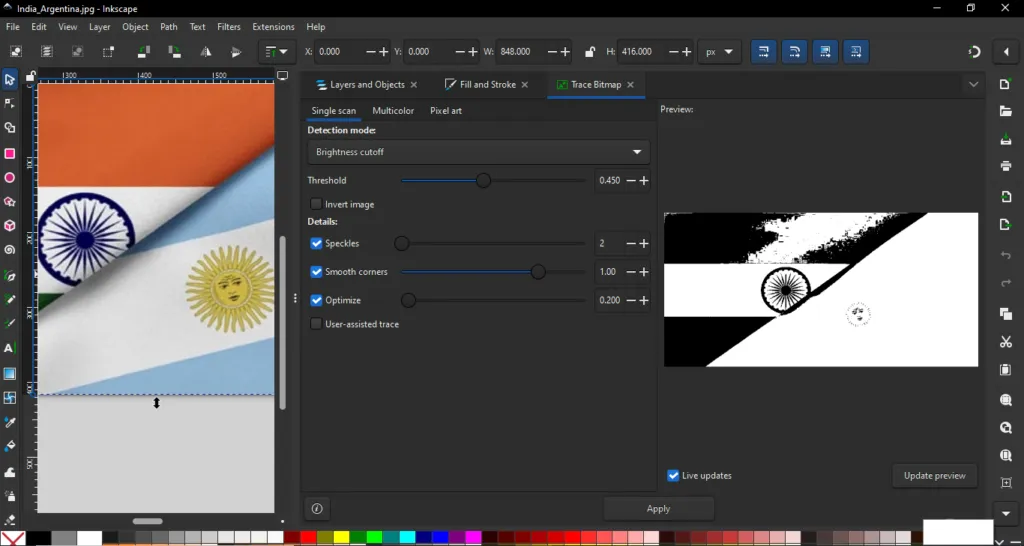
Step 7: In here we will use aSingle Scan where we are using a Brightness cutoff and threshold, Speckles. We have got everything set to the defaults and the result looks relatively good.
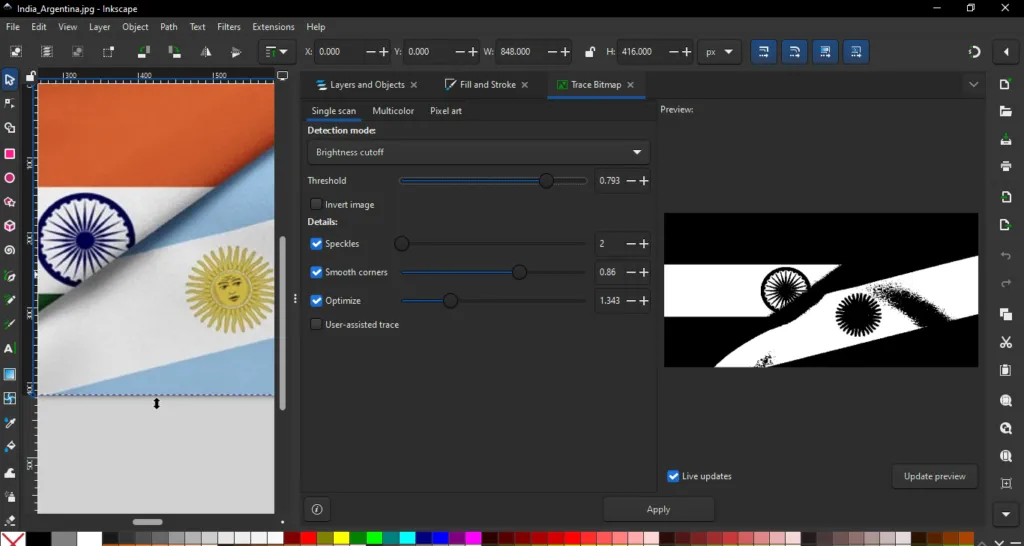
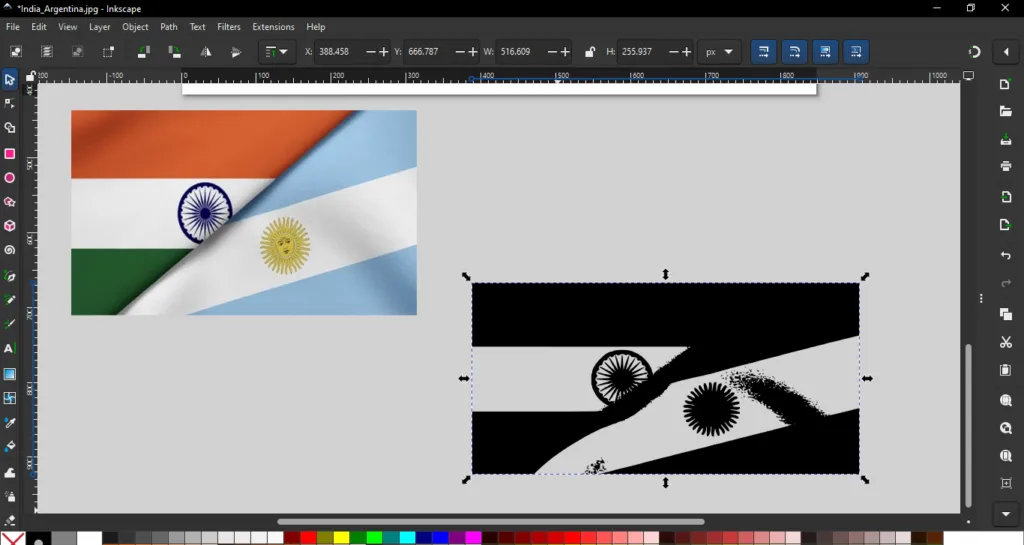
Step 8: After the adjustments click on Apply and then shift the Preview dialogue box to the right hand side. Then we get the vector image of our image traced for us.
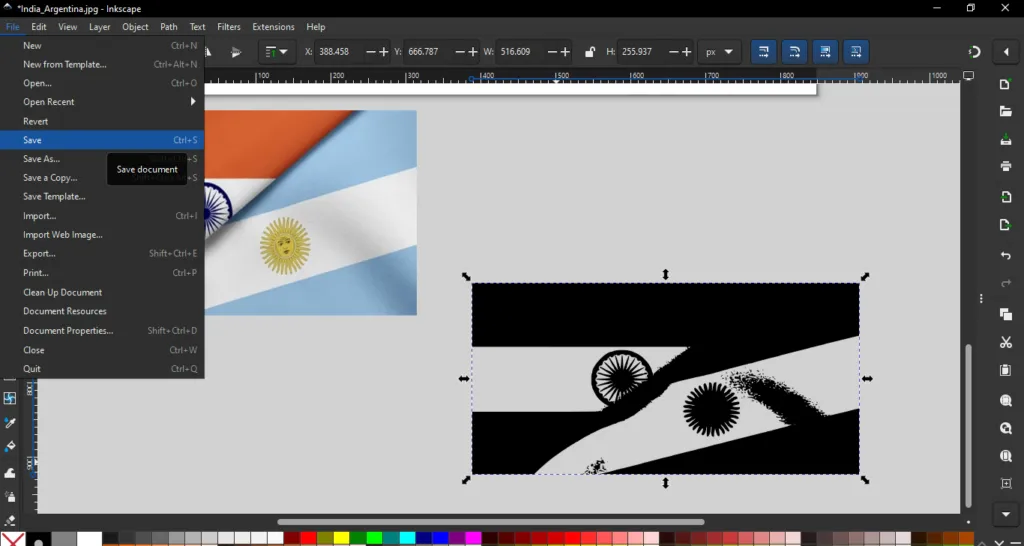
Step 9: Save and Export: Once you're satisfied with the design, save the file in a vector format such as .AI, .SVG, or .EPS. You can also export it as a .PNG or .JPG for non-vector uses.
Design Stunning Graphics and Images With Our Services!
Knowledge of vector images and their application is necessary for every designer striving to produce high-quality visuals. From custom neon signs to wall graphics, it allows for usage in different areas because of its scalability, making it a true help in achieving the best quality. By mastering vector artworks and file formats, designers will build their way to professionalism with crisp work across any print medium.

An enthusiastic Graphic Designer professional with strong communication and organisational skills, who is passionate about creating and developing innovative ideas with the client to help them get their business noticed. I work to the highest standards and have an excellent eye for detail with skills in design and organisation. I am a dependable and productive worker whose honesty and integrity provides effective leadership and builds excellent relationships. I enjoy innovatively…